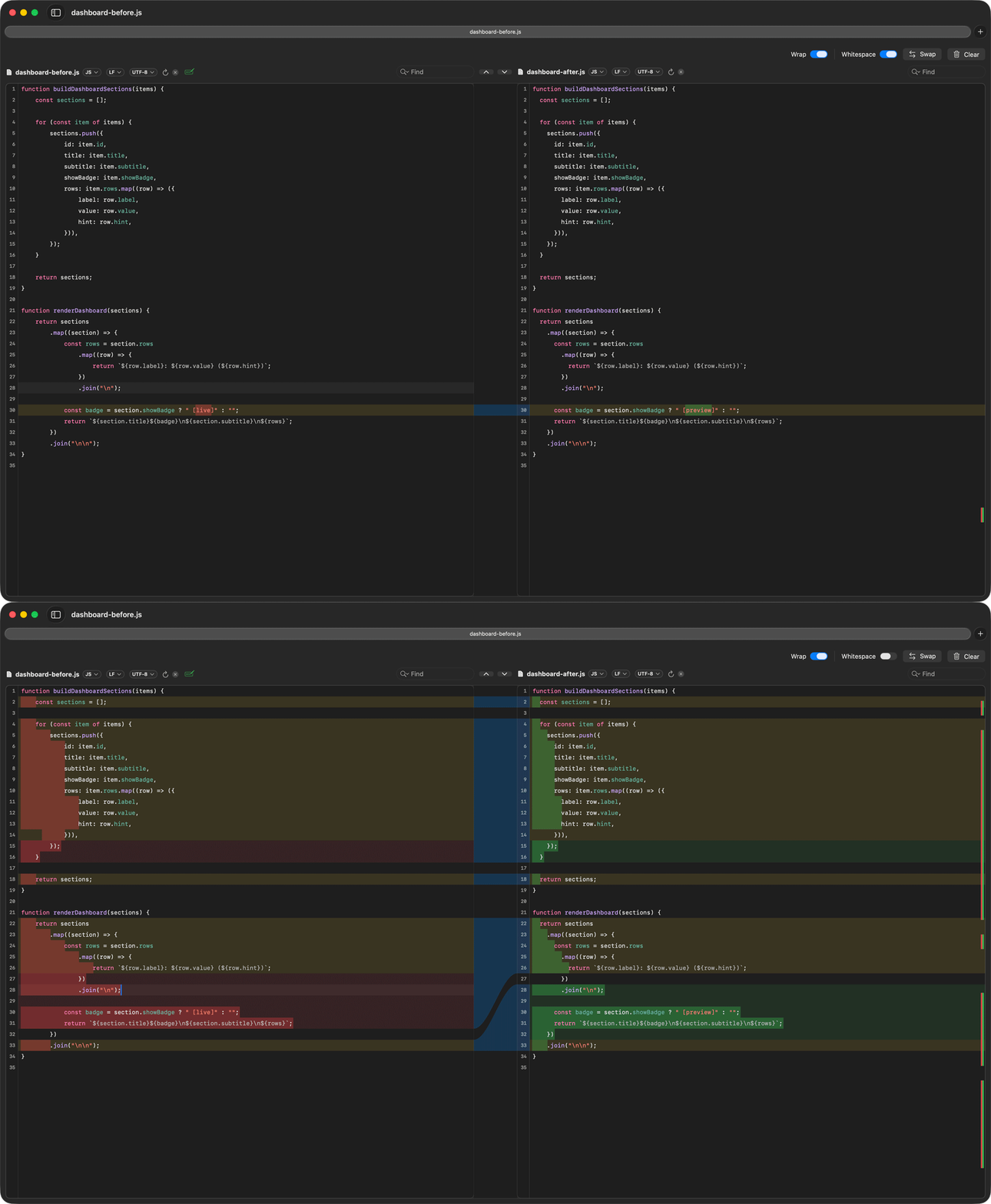
RibbonDiff with whitespace-only changes filtered out so the remaining logic changes are easier to review.
Ignore whitespace-only diffs on Mac
Whitespace-only changes can swamp a review when a file was re-indented, aligned differently, or saved with trailing-space cleanup. RibbonDiff includes a Whitespace control so you can turn the saved whitespace filters on or off together and get back to the real changes.
Suggested sample files
- metrics-before.py and metrics-after.py — mostly formatting noise plus one wording change.
- WorkoutRow-before.swift and WorkoutRow-after.swift — SwiftUI styling changes with lots of reformatting.
- dashboard-before.js and dashboard-after.js — formatting changes plus one updated badge label.
How to try it
- Open one of the file pairs with whitespace filtering off.
- Pause while the diff looks noisy.
- Turn the Whitespace control on.
- Point to the remaining real change, such as
recovery flagsbecomingrecovery alerts.
Where this helps
- Codebases that were reformatted.
- Markdown or documentation with line-wrap churn.
- Templates where indentation and trailing spaces changed but the logic mostly did not.