Something interesting has happened to my development workflow.
I still respect the IDE. I still use Xcode when I need the things Xcode is uniquely good at: signing, platform settings, deep debugging, and the native Apple development surface. But for more and more day-to-day product work, the IDE is no longer the center of the loop.
The center of the loop is now Codex and RibbonDiff.
Codex turns intent into code. It can inspect the project, make a scoped change, compile it, run tests, and iterate until the code is in good shape. RibbonDiff gives me the other half of the workflow: a fast, visual, Mac-native way to understand exactly what changed.
That combination has changed how development feels.
The bottleneck moved from typing to reviewing
For a long time, the development experience was organized around editing. You opened an IDE, navigated files, typed code, fixed compiler errors, jumped to definitions, and slowly shaped the implementation by hand.
AI coding tools changed that rhythm. When Codex can produce safe, compiling code, the slowest part is often no longer typing the code. The slowest part is deciding whether the change is correct.
That is a different job.
You need to answer questions like:
- Did the implementation touch only the right files?
- Is the behavior change easy to understand?
- Did it introduce accidental complexity?
- Are there edge cases hidden in a nearby branch?
- Does the final diff tell a clean story?
This is where a normal IDE can start to feel too heavy. An IDE is excellent when I want to construct code. But when I want to inspect a change, I want a surface designed around comparison, not around editing a single file.
RibbonDiff is that surface.
RibbonDiff makes code changes visible
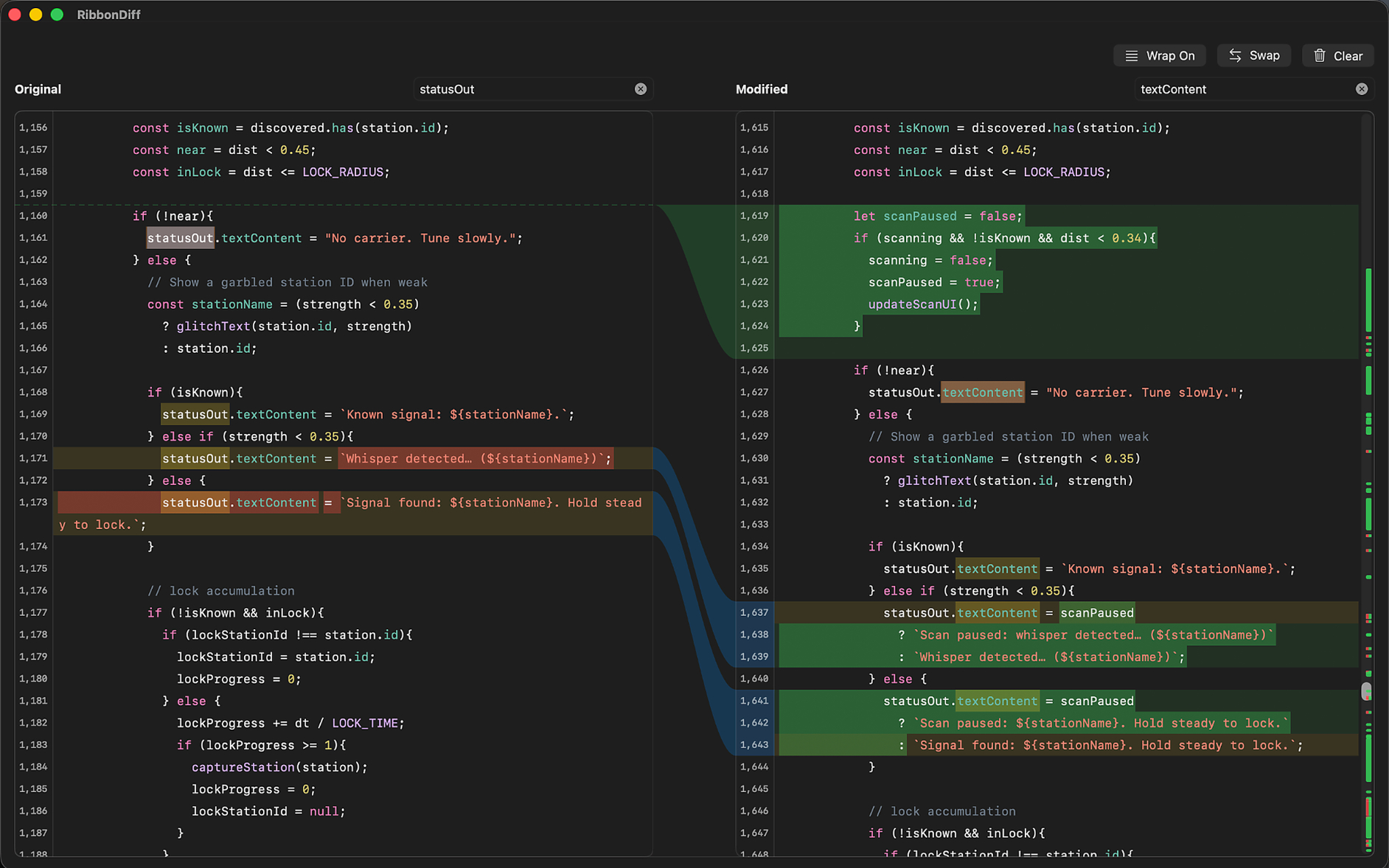
RibbonDiff is a Mac-native side-by-side diff tool with editable panes and a center ribbon that connects matching change blocks. That sounds simple, but in practice it matters a lot.
When Codex makes a change, I do not want to mentally reconstruct the change from scattered file tabs. I want to see the before and after. I want additions, removals, replacements, and moved structure to be visually obvious. I want to jump between change blocks without losing orientation. I want the diff itself to become the object I am working on.
The center ribbon is especially important. It gives the comparison a physical shape. Instead of reading two panes as separate documents, you see how the left and right sides correspond. Large edits become easier to scan because the structure is visible before every line is read.
That reduces review fatigue. It also makes review more honest. A change that is too broad, too tangled, or too surprising becomes visually obvious. You can feel when the implementation is doing more than the request required.
Review is not passive
The best part is that RibbonDiff is not just a viewer.
Because the panes are editable, reviewing does not have to become a separate phase from fixing. If I see a naming issue, a missing guard, a small formatting problem, or an awkward branch, I can correct it while still looking at the comparison. I do not have to jump back into the IDE, find the file again, make the adjustment, then return to the diff and rebuild my mental context.
That keeps the loop small:
- Ask Codex for a change.
- Let Codex compile or test it.
- Open the result in RibbonDiff.
- Inspect the actual change.
- Make small corrections or ask Codex for another pass.
This is a much calmer loop than bouncing between a terminal, an IDE, a git client, and a separate review tool. The diff stays central.
Workspaces make AI-generated changes easier to trust
The bigger the change, the more important context becomes.
RibbonDiff Workspaces help here because they let a project feel like a reviewable environment instead of a pile of individual comparisons. When Codex touches multiple files, the question is not just "what changed in this one file?" It is "what changed across the project, and does that whole set of edits make sense together?"
Workspace navigation, search, tabs, and file tree context make that review smoother. I can move through the files that matter, keep related comparisons open, and stay oriented inside the project without needing to fully reopen the IDE mindset.
For AI-assisted development, this is essential. Codex is very good at local implementation work, but the human still owns product judgment. RibbonDiff gives that judgment a better place to happen.
Fast diffing keeps the flow alive
A review tool only helps if it stays responsive.
When a comparison involves large files, large paste operations, or a busy workspace, delays break concentration. You start thinking about the tool instead of the change.
RibbonDiff is built around the idea that diffing should feel immediate enough to remain part of the creative process. Large comparisons, syntax highlighting, scrolling, search, and ribbon alignment all affect whether review feels smooth or tiring. These details are not cosmetic. They decide whether developers actually stay in the review loop.
That matters even more with Codex. AI can produce changes quickly, so the review tool has to keep up. If the diff surface is slow or visually noisy, the advantage disappears.
The IDE is still useful, but it is no longer always home base
This is not an argument that developers should abandon IDEs.
IDEs are powerful. Xcode remains important for Apple platform development. There are times when stepping through a debugger, inspecting build settings, managing signing, or using platform-specific tooling is exactly the right thing to do.
But the everyday development loop is changing.
When Codex can safely edit and compile, I do not always need to live inside the IDE to produce code. What I need is confidence. I need to see what changed. I need to understand the shape of the implementation. I need a fast way to accept, reject, or refine the result.
RibbonDiff turns that review step into a first-class development experience.
The new loop feels more focused
The biggest improvement is not just speed. It is focus.
Codex lets me describe what I want at a higher level. RibbonDiff lets me inspect what actually happened at a concrete level. One is good at turning intention into implementation. The other is good at turning implementation back into understanding.
That pairing feels natural.
I spend less time wrestling with editor state. I spend less time opening and closing file tabs. I spend less time scanning unrelated UI. More of my attention goes where it belongs: the code change itself.
And because the diff is so visible, I feel more comfortable letting Codex do meaningful work. I am not blindly trusting generated code. I am reviewing it with a tool that makes the change legible.
That is the real improvement. RibbonDiff does not replace developer judgment. It amplifies it.
A better review surface for the AI era
AI coding tools are making software development faster, but speed alone is not enough. Developers still need control. We still need taste. We still need to understand the code we ship.
RibbonDiff improves the development experience because it respects that reality.
It gives developers a clean, responsive, visual way to review the work. It makes changes easier to scan, easier to trust, and easier to refine. It works especially well in a Codex-driven workflow because it turns AI output into something a human can quickly understand.
For me, that has changed the center of development.
I still use the IDE when I need it. But for many changes, the real loop is now much simpler: ask Codex, compile safely, review in RibbonDiff, refine, ship.
That is a quieter workflow. A faster one too. But more importantly, it feels like a better way to think.